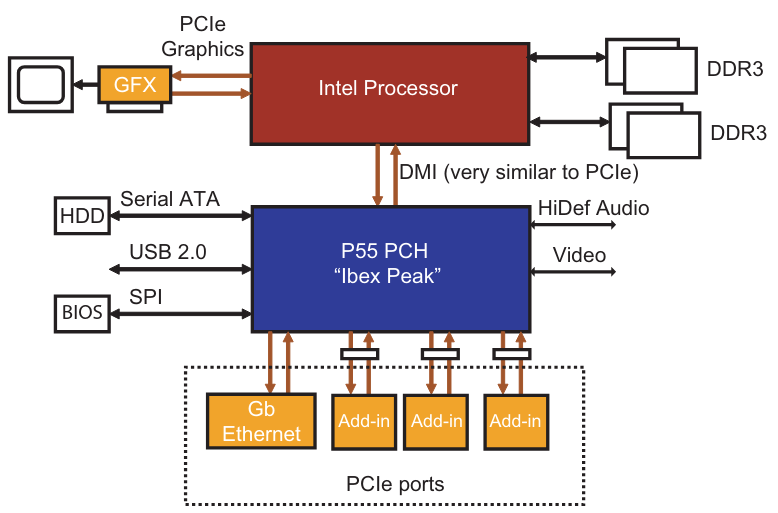
Low-Cost PCIe System (Consumer Desktop)
- Looks very similar to an old PCI system — just with PCIe Links instead of a shared PCI bus.
- Typical features:
- A few PCIe Root Ports directly from the CPU or chipset.
- A couple of add-in card slots (x16 for GPU, maybe x1 for Wi-Fi or sound card).
- Basic I/O controllers (USB, SATA, Ethernet) connected via PCIe or chipset fabric.
- The goal here is low cost, not maximum expandability.
📌 Key idea:
Even though it’s PCIe, it still feels like the old architecture — CPU at the top, a few slots and devices hanging off the “bus.”
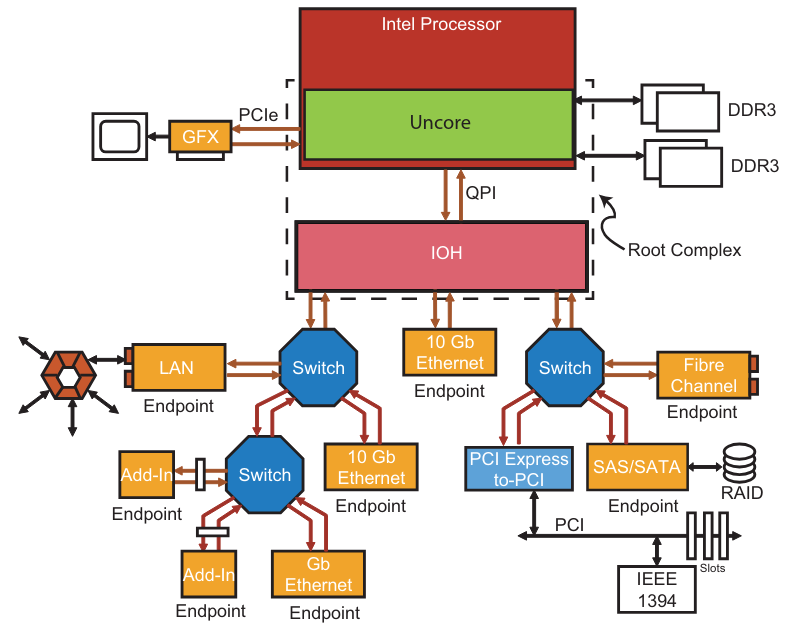
High-End PCIe System (Server)
- Includes many more PCIe ports, often with:
- Multiple Root Ports for different peripherals.
- Onboard high-speed network interfaces (Ethernet, Fibre Channel, etc.).
- Storage controllers (NVMe, RAID) integrated into the system.
- Early on, there was an idea to make PCIe replace traditional networks (because PCIe is packet-based and full-duplex), but this never really took off.
- Servers still use Ethernet/InfiniBand for network traffic, not PCIe over cables.
📌 Key idea:
PCIe is still mainly for inside-the-box communication (CPU ⇆ GPU ⇆ storage ⇆ NIC), not for external networking.
Root Complex Details (Important!)
- The Root Complex (RC) is not always one chip.
In modern CPUs:- Part of the RC is inside the CPU package (the PCIe controller, memory controller, routing logic).
- Other parts may be in a separate chipset (PCH, southbridge).
- Collectively, these parts form the Root Complex and appear as bus 0 to software.
- The text uses the term Uncore to refer to everything in the CPU package that is not part of the CPU cores (e.g., PCIe controller, memory controller).
📌 Key idea:
The Root Complex is a logical concept, not necessarily a single chip — it’s whatever provides the interface between CPU cores and PCIe devices.